Penthara-Logo-Dark
For Organizations
Header

Azure Foundry’s Content Safety Layer: How AI Guardrails Are Implemented in Production

Azure Foundry’s safety layer uses multi-point guardrails - input, output, and prompt protection - to control risk and secure AI in production.

Most teams talk about “AI guardrails” like it’s one feature.

In production, it’s a stack.

Not one control. Multiple controls. At multiple points. With very specific actions.

Azure Foundry implements guardrails through content filtering and guardrails + controls, powered by Azure AI Content Safety classification models.

This post decodes what’s actually happening.

Input filters. Output filters. Prompt shields. Jailbreak detection. And how these pieces fit together.

The mental model: intervention points

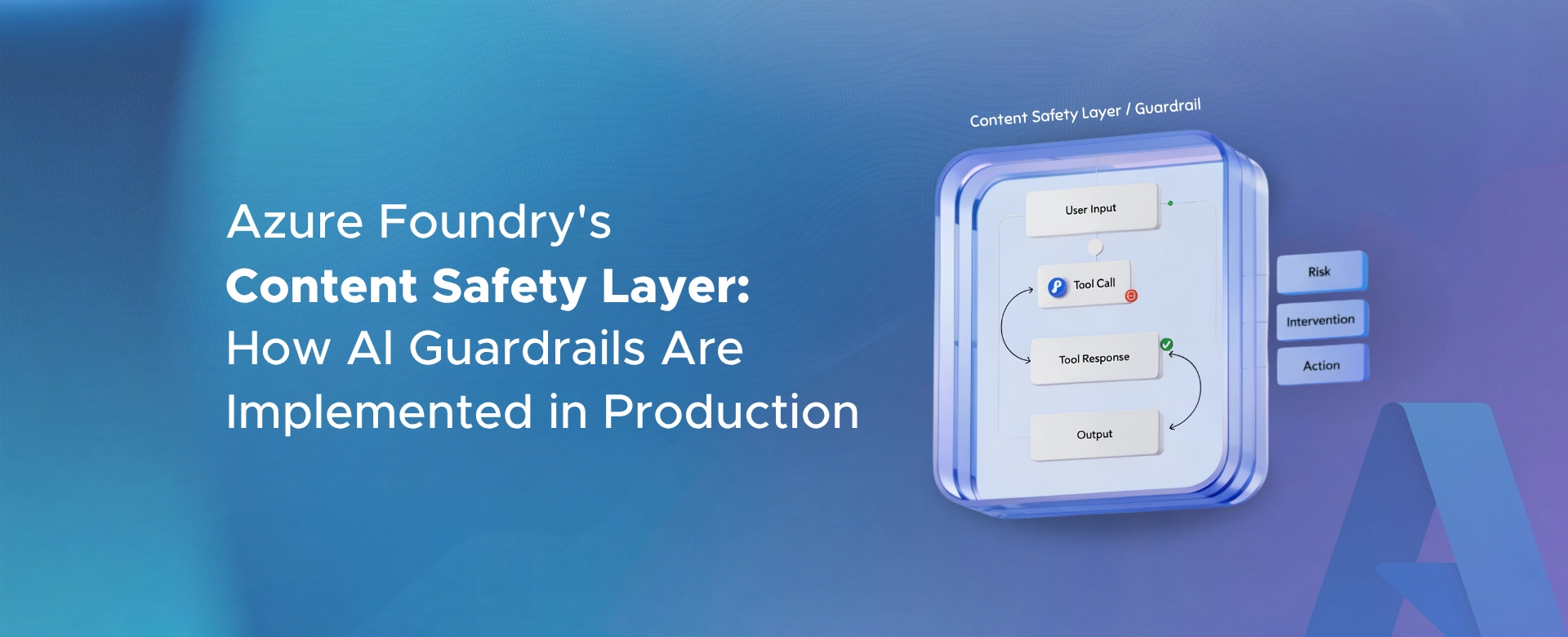
Foundry guardrails are built around intervention points.

Meaning: where in the request lifecycle the platform scans and can intervene.

The common intervention points include:

User input Output Tool call (agents, preview) Tool response (agents, preview)

So the safety stack is not just “check the final response.”

It can scan what users send in. And in agent scenarios, it can scan what tools are being called and what comes back.

Layer 1: Input filters (before the model runs)

Input filtering means the system evaluates the prompt before it reaches the model.

The filtering system runs both the prompt and the completion through classification models designed to detect potentially harmful content.

The common harm categories are:

Hate Sexual Violence Self-harm

And the severity levels are typically expressed as:

Safe Low Medium High

The key production detail is that thresholds are configurable by category.

So “input filters” are essentially a policy decision:

What severity do we block? What do we allow? Do we block or only annotate?

Layer 2: Output filters (before the user sees the answer)

Output filtering repeats the safety evaluation on the model completion.

This matters because:

A safe prompt can still lead to an unsafe answer. A normal user can still trigger unsafe content. And models can drift into unsafe territory without explicit instruction.

So Foundry evaluates both sides:

Input prompt Output completion

This is how you prevent unsafe completions from reaching the user, even when the user input looked harmless.

Layer 3: Prompt Shields (jailbreak + indirect prompt injection)

This is the layer most teams care about now.

Because harmful content filtering is not the only risk.

Prompt injection is.

Prompt Shields is designed to detect and block adversarial input attacks before content is generated.

It focuses on two major attack types:

Jailbreak attacks (direct user prompt attacks) Indirect attacks (prompt injection through documents and third-party content)

Why this matters:

If your application processes external content like emails, documents, web pages, or tickets, you are exposed to indirect prompt injection by default.

Prompt Shields exists because models can’t reliably distinguish “trusted instruction” from “untrusted content” unless you add guardrails.

How jailbreak detection is treated in Foundry

Jailbreak detection is not a vague idea here.

It’s implemented as a specific protective layer that detects attempts to override system rules or manipulate the model into unsafe behavior.

This includes patterns like:

“ignore the rules” prompts role-play jailbreak attempts embedded malicious instruction tricks attempts to extract sensitive information or change system behavior

The point is not to “make jailbreaks impossible.”

The point is to catch them early and enforce a consistent response.

What “guardrails” mean inside Foundry

In Foundry terms, guardrails are not the same thing as content safety.

A guardrail is a named collection of controls.

Each control defines:

A risk to detect Where to scan for it (intervention points) What action to take when detected

This is how the system becomes manageable in production.

Because you can build different guardrail profiles for different deployments:

Public chatbot Internal assistant Regulated workflow agent Customer support copilot Developer-facing tool

And apply different controls based on risk tolerance.

One detail teams miss: filtering is not universal for every model type

Many teams assume that “content filtering applies to everything.”

That is not always true.

Some model types and modalities have different behavior and coverage.

So if your safety plan assumes every input and output is always covered the same way, validate that assumption for your specific deployment type.

This is one of the most common production gaps.

How this looks in a real production pipeline

If you reduce the stack to a simple production view, it looks like this:

User input arrives Input filters run Prompt shields run Model generates output Output filters run Response is returned, blocked, or annotated depending on policy

If you are using agents, additional intervention points can apply for tool calls and tool responses.

What this means for engineering leaders

This safety stack is not “checkbox compliance.”

It is a production design decision.

Because the moment you set thresholds and actions, you are choosing:

How strict the experience feels How many false positives you tolerate How much risk you accept How exceptions are handled and escalated

Foundry gives you a structured way to implement guardrails in production.

But it does not choose the policy for you.

Let’s connect

If you’re deploying LLM apps or agents on Foundry and you’re trying to answer:

What should be filtered at input vs output? When should prompt shields block vs annotate? How strict should thresholds be in production? What coverage gaps exist across different modalities?

I’m happy to share a practical rollout approach that avoids the common mistakes.

Feel free to contact us.

Written & Reviewed by

Jasjit Chopra

Chief Executive Officer
Comment Now

Leave a Reply

Your email address will not be published. Required fields are marked *

More from this Category
Azure AI

Document Intelligence Is One of the Most Practical Azure AI Use Cases Today

Azure AI Document Intelligence turns everyday business documents into structured, usable data - delivering fast, measurable ROI beyond OCR and...

Azure AI

Azure AI Can Solve Repetitive Work Teams Quietly Accept as “Normal”

Azure AI quietly eliminates repetitive, manual work teams accept as normal - freeing time, reducing errors, and boosting operational efficiency...

Azure AI

Regulated Industries Can’t Treat AI Like a Side Experiment

In regulated industries, AI can’t be a side experiment. Governance, accountability, and control must be built in from day one...

crossmenuchevron-down