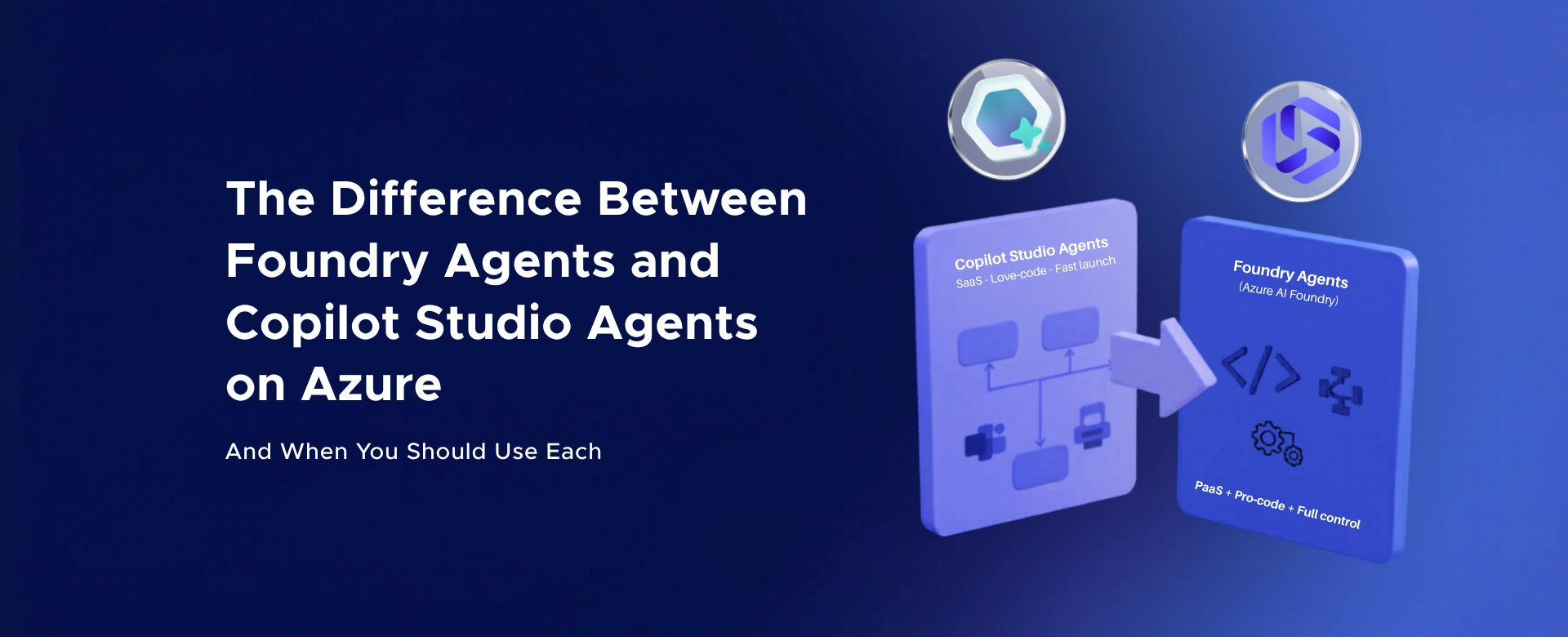
Creating a Copilot Agent for SharePoint: Step-by-Step Guide
Learn how to create a Copilot Agent for SharePoint using SharePoint and Copilot Studio. Follow this step-by-step guide to build...

AI is no longer just a trend. It’s transforming how companies operate, make decisions, and save time.
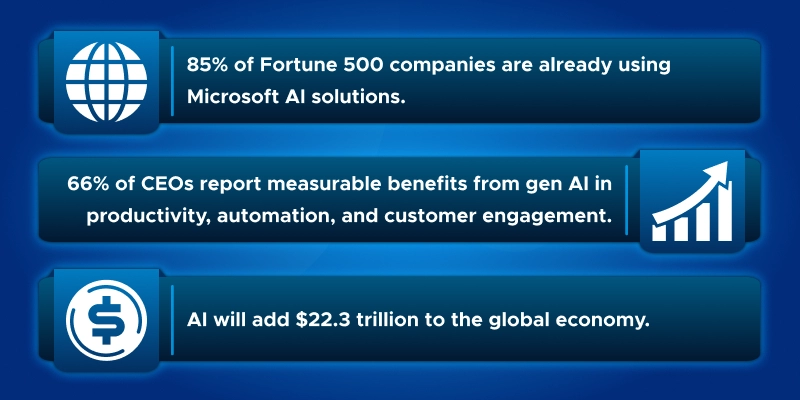
85% of Fortune 500 companies are already using Microsoft AI solutions.
66% of CEOs report measurable benefits from generative AI in productivity, automation, and customer engagement.
Industry research predicts AI will add $22.3 trillion to the global economy.
Companies that leverage AI effectively can streamline workflows, reduce repetitive tasks, and free employees for higher-value work.
Microsoft stands out because it combines cutting-edge AI with enterprise-grade security and compliance.
Customers don’t just get powerful models; they get trust, scalability, and peace of mind.
As Microsoft EVP Judson Althoff says:
“AI is blurring the lines between personal and organizational productivity.”
At the heart of this transformation?
Azure OpenAI.
It empowers companies to innovate, automate, and save time - turning AI from a futuristic concept into a practical business advantage.

Azure OpenAI is built for businesses that need more than just powerful models.
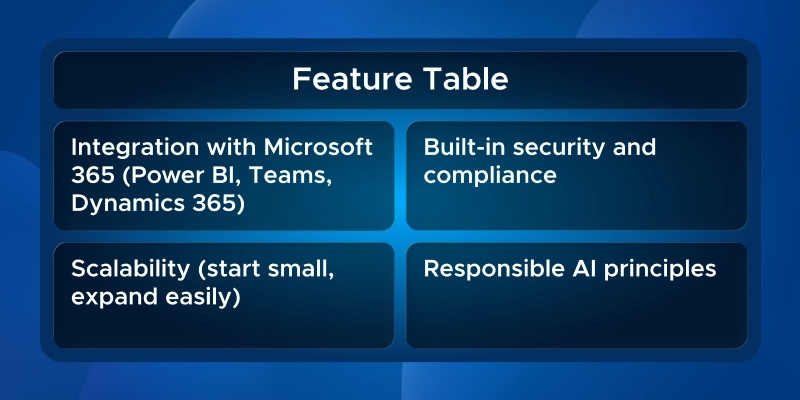
It integrates seamlessly with the Microsoft 365 ecosystem.
That means companies can connect it with existing tools like Power BI, Teams, and Dynamics 365 without starting from scratch.
Security and compliance aren’t optional here - they’re built-in.
Data stays protected, and enterprises can meet strict regulations while using AI at scale.
Scalability is another game-changer.
Companies can start small, test a workflow, and expand across departments without slowing down operations.
From automating repetitive tasks to generating actionable insights, Azure OpenAI supports a wide range of business applications.
It’s designed to reduce manual effort and accelerate decision-making.
Microsoft’s responsible AI principles ensure the platform is reliable and ethically guided.
In short, Azure OpenAI combines integration, security, scalability, and reliability, making it the AI choice for enterprises ready to innovate.

Customer support is often the first place businesses see the impact of AI.
Customers expect fast, accurate answers 24/7, and repetitive queries can overwhelm human agents.
Azure OpenAI helps companies meet this demand at scale.
It can create intelligent chatbots and voice assistants that understand natural language, pull information from internal databases, and provide instant answers - all while keeping data secure.
Multi-channel deployment is possible too.
The same AI can handle web chat, WhatsApp, or phone line inquiries, ensuring consistent service across platforms.
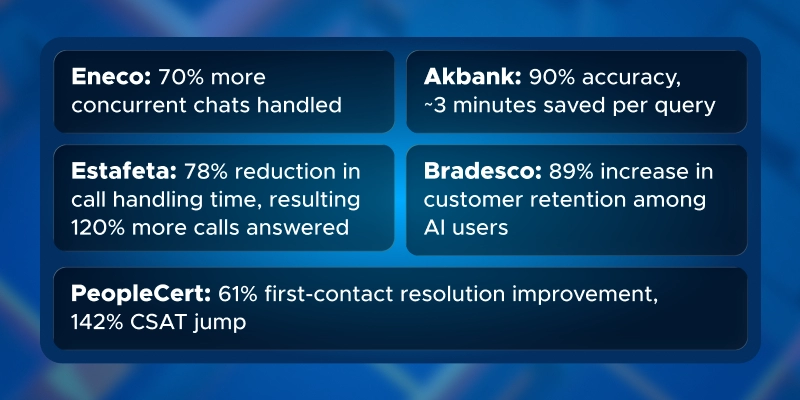
Here are some real-world examples:

A huge impact area is how employees work - automating repetitive tasks, finding information faster, and acting as a “copilot” in daily workflows.
Azure OpenAI gives employees AI assistance directly in tools they already use, like Microsoft 365 Copilot or GitHub Copilot.
It can draft emails, summarize meetings, generate document outlines, answer ad-hoc questions, and pull info from internal knowledge bases.
The result: less busywork, fewer errors, and more time for strategic, creative tasks.
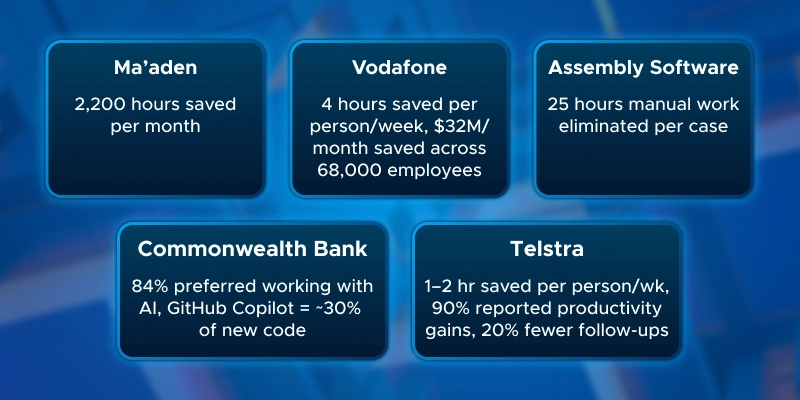
Here are real-world examples of companies boosting employee productivity with Azure OpenAI:

AI isn’t just for customer service or office tasks.
It’s transforming behind-the-scenes operations that keep businesses running.
Azure OpenAI can handle unstructured or semi-structured data - emails, PDFs, forms, logs - faster and more accurately than humans.
It integrates with other Azure tools like Form Recognizer or Azure Arc, so even legacy workflows can get an AI upgrade without rebuilding everything.
The value?
Faster processes, fewer errors, lower costs, and improved compliance.
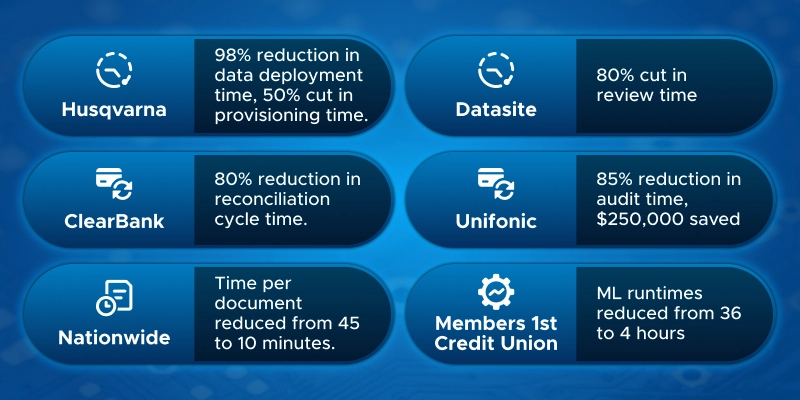
Here are concrete examples of Azure OpenAI in operations:
Why this matters:
Azure OpenAI can streamline any process, from factories to finance to insurance.
Executives see tangible outcomes: faster cycle times, cost savings, risk reduction, and scalable operations.
Combining AI with IoT, RPA, and cognitive search shows the platform’s flexibility and enterprise readiness - without needing to explicitly compare it to competitors.
Even complex workflows, legacy systems, and regulated industries can benefit - AI does the heavy lifting while humans handle exceptions and strategy.

Azure OpenAI isn’t just about efficiency - it powers new products, features, and business models.
Companies can do things previously impossible or enhance offerings to gain competitive advantage.
With access to world-class AI models like GPT-4, DALL-E, and Codex, even non-tech companies can experiment without large R&D teams.
This enables:
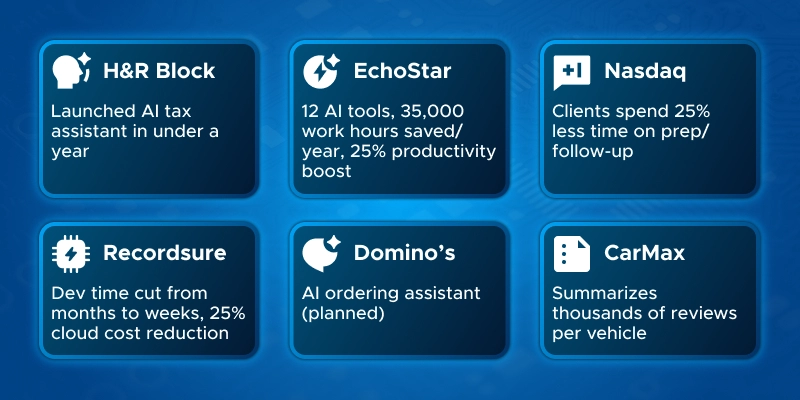
Here are real-world examples:
Key message:
Azure OpenAI serves as a launchpad for innovation: faster development, smarter products, and new revenue streams.
Companies gain speed and control, ensuring responsible AI deployment while unlocking business growth.

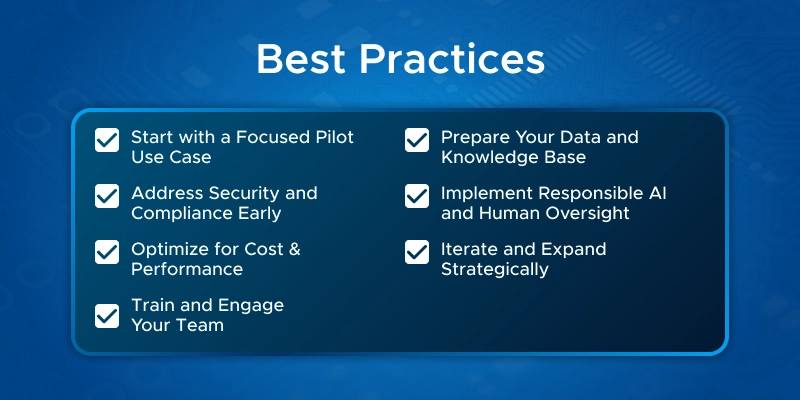
By now, it’s clear what Azure OpenAI can do. The next question for business leaders is: “How do we actually realize these benefits while avoiding pitfalls?”
Benefit: Demonstrates ROI, builds stakeholder buy-in, and mitigates risk.
Tip: Better grounding = more accurate and useful AI outputs.
Benefit: Smooths deployment, builds trust with InfoSec and compliance teams.
Principles to follow: fairness, reliability, privacy, inclusiveness, transparency, accountability.
Benefit: Ensures AI delivers value without overspending.
Benefit: Boosts adoption, increases satisfaction, and fosters trust.
Benefit: Turns a pilot into a scalable, evolving AI program, maintaining a competitive edge.

Stakeholders inevitably ask: “What are we getting from this AI investment?” Quantifying ROI is critical to justify projects, sustain executive support, and highlight business value. While our case studies have sprinkled results throughout, this section provides a systematic guide for measuring Azure OpenAI’s impact in financial and operational terms.
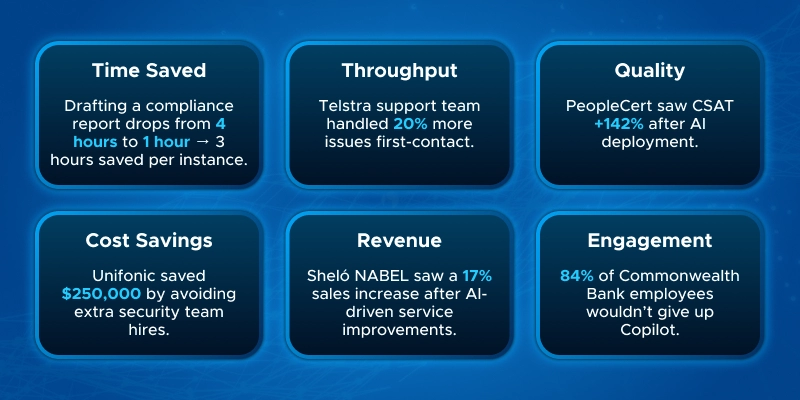
Key Metrics to Track
Benefit: Shows immediate productivity gains and potential redeployment of employee time to revenue-generating work.
Benefit: Captures efficiency beyond mere time savings, demonstrating scalable capacity gains.
Benefit: Highlights risk reduction and improved customer experience as ROI factors.
Benefit: Converts efficiency gains into tangible budget savings.
Benefit: Shows AI’s strategic value beyond cost-cutting, linking it to growth.
Benefit: Highlights AI’s role in enhancing workforce effectiveness and satisfaction.
Building the ROI Case
Example: Vodafone saved ~4 hours per employee/week (~$32M/month across 68,000 employees) versus modest Azure OpenAI subscription costs, showing a stark business case.
Key Takeaway
Quantifying Azure OpenAI’s impact requires tracking productivity, capacity, quality, cost, revenue, and employee engagement. Combining these metrics demonstrates tangible ROI, helps justify AI investments, and positions your organization as outcome-focused, not just tech-focused.

AI Solutions Partner: Recognized for excellence in Data & AI, cloud integration, and enterprise AI adoption.
Certified Experts: Our team holds Microsoft certifications and has hands-on experience with Azure OpenAI, Cognitive Services, and AI workflow automation.
Proven Results: We’ve delivered AI-powered solutions that improve productivity, reduce costs, and accelerate innovation across industries.
End-to-End Support: From pilot projects and data preparation to deployment, governance, and scaling, we guide you every step of the way.
Ready to transform your business with AI?
Schedule a free consultation today and let our experts design the right Azure OpenAI solution for your organization.
Bottom line: Organizations embracing Azure OpenAI are not just improving operations - they’re shaping the future of AI-driven business.

Azure OpenAI integrates advanced AI models like GPT-4 into Microsoft's cloud platform, enabling businesses to automate tasks, enhance customer interactions, and drive innovation across various functions.
ROI can be assessed through key metrics such as time saved, increased throughput, quality improvements, cost savings, revenue uplift, and enhanced employee productivity.
Focus on:
Flash.co achieved a 366% ROI with a 9.6-month payback period by implementing Azure AI Foundry and Azure ML, leading to 30% efficiency improvements across multiple departments.
Implementing Azure OpenAI can reduce customer service calls requiring human interaction by 10% to 50%, leading to improved efficiency and customer satisfaction.
Azure Monitor and Azure Application Insights offer full-stack monitoring, allowing you to collect, analyze, and act on telemetry data from your Azure and on-premises environments.
Utilize Azure OpenAI's evaluation tools to test models against expected input/output pairs, assessing performance across key metrics such as accuracy and reliability.
Azure OpenAI supports three pricing models:
Azure OpenAI adheres to Microsoft's Responsible AI principles, implementing safety measures to ensure data privacy and model safety.
Yes, Azure OpenAI allows for fine-tuning models to align with your organization's specific requirements and data, enhancing relevance and accuracy.
Azure OpenAI is versatile and can be applied across various industries, including healthcare, finance, retail, manufacturing, and public services, to drive efficiency and innovation.
Azure OpenAI's flexible deployment options and integration with Azure's cloud infrastructure enable businesses to scale AI solutions according to their needs.
Costs vary based on the chosen pricing model and usage levels. It's essential to assess your organization's needs and select the appropriate model to optimize costs.
Begin by exploring Microsoft's Azure AI Foundry, which provides resources and tools to help you integrate and deploy Azure OpenAI solutions effectively.
Visit Microsoft's official blog and other reputable sources to explore real-world case studies showcasing the impact of Azure OpenAI across different sectors.

Learn how to create a Copilot Agent for SharePoint using SharePoint and Copilot Studio. Follow this step-by-step guide to build...
Explore July 2025 Copilot updates: smarter chat history, discreet Teams support, writing help in Edge, audio summaries in Word, and...
Monthly updates, news & events from Microsoft to help you & your business grow & get best out the Microsoft...