What's new in Microsoft Copilot | June 2025
Discover the latest Microsoft Copilot updates from June 2025, including new AI-powered features in Word, Excel, Teams, Outlook, and Edge....

Your organization finally launched its first Copilot Studio agent.
It starts small - an internal assistant that answers common questions, pulls knowledge from SharePoint, and triggers a few Power Automate flows. People love it. Adoption spreads fast.
Then, usually after the “wins” slide has already been shared, someone asks the question that changes the mood in the room:
“What stops this agent from leaking sensitive data or being manipulated at runtime?”
Copilot Studio agents are powerful. But without deliberate security and governance, they quietly become a new attack surface - one that blends identity, data, and actions in the same conversational interface.
This blog walks through practical security and governance considerations for Copilot Studio agents - technical enough for admins and security teams but grounded in how organizations actually deploy and scale agents.
Traditional bots mostly responded. Modern agents act.
That combination - data access + execution paths + natural language inputs - is why organizations should treat agents like workload identities and governed apps, not “just another bot.”
Practically, this means governance is not optional. It’s part of production readiness.
Most organizations focus on build-time governance: who can create agents, what connectors are allowed, and what data sources are approved. That’s necessary - but it’s not enough.
At runtime, agents are exposed to:
This is where traditional governance stops - and where real incidents begin.
A typical scenario looks harmless at first.
An internal HR agent is created to answer policy questions.
It connects to SharePoint to retrieve documents.
For ease of access, authentication is not enforced.
The agent is then shared more broadly.
A user asks a slightly reworded question.
The agent retrieves and returns content from a document that was never meant for general visibility.
No alert is triggered.
No one notices immediately.
This is how most data exposure incidents begin.
Not with a breach, but with a configuration that made sense at the time.
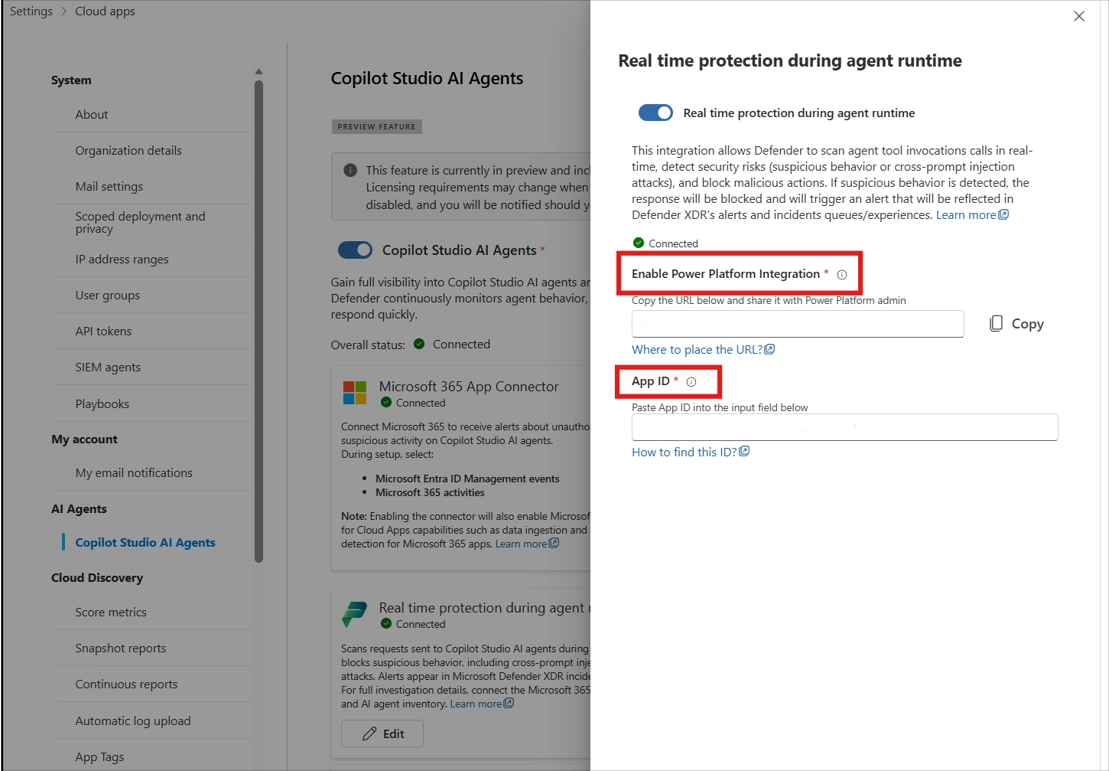
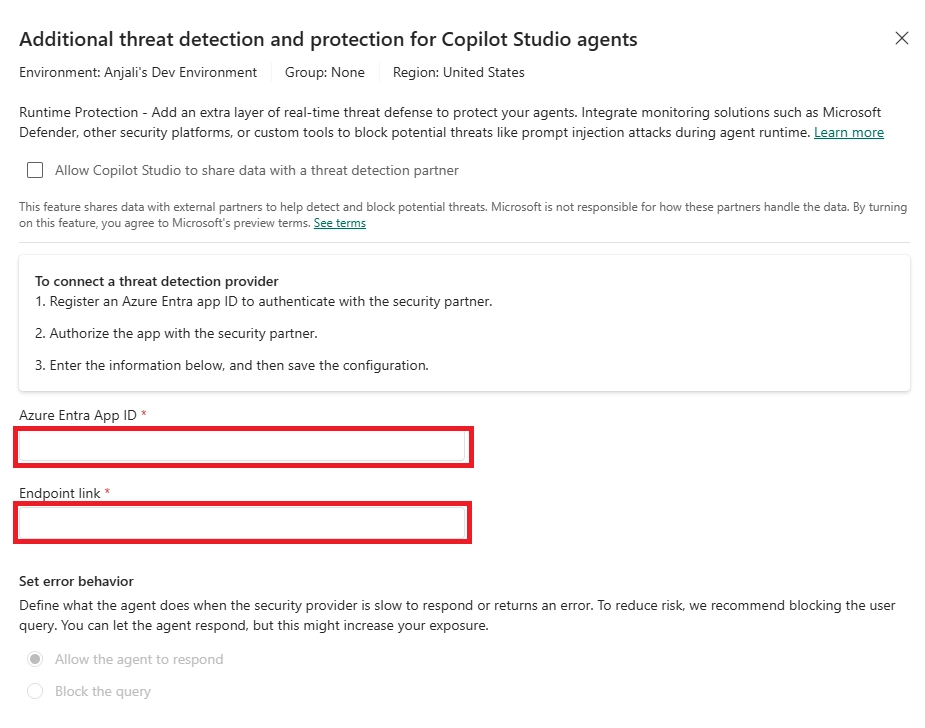
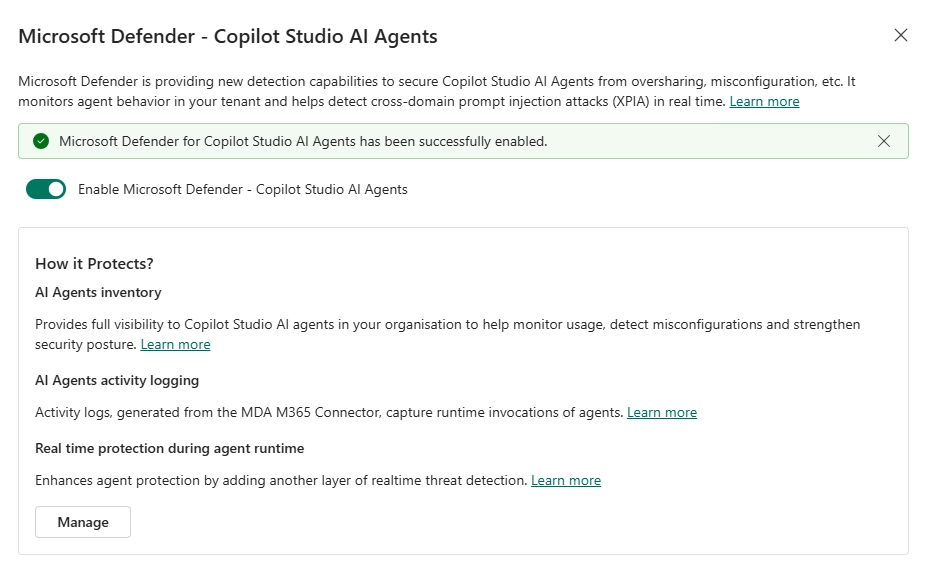
Microsoft provides a (Preview) capability to protect Copilot Studio custom agents in real time during runtime through Microsoft Defender integration. The key idea is adding an inspection layer that evaluates prompts, responses, and behavior while the agent is running - not just after an incident.
High-level setup pattern (what organizations should plan for):


The takeaway isn’t just “turn it on.” It’s that agents are expected to live inside your security ecosystem - governed like any other enterprise workload.
This creates an inline security loop where agent execution can be allowed or blocked dynamically.
AI rarely fails loudly.
It fails politely.
Runtime protection is what stops helpful answers from becoming security incidents.
Prevention alone is never enough.
Organizations also need visibility, evidence, and investigation capability.
Even well-built agents drift over time: new data sources, new connectors, new makers, and new usage patterns. Most incidents come from gradual misconfiguration - not a single obvious mistake.
Security and governance teams need signals that answer questions like:
This is where Defender-backed monitoring becomes the difference between “we think it’s secure” and “we can prove it’s behaving as intended.”

One of the biggest AI risks isn’t attackers - it’s convenience.
A maker publishes an agent without authentication.
A connector pulls from SharePoint.
Suddenly, internal data is accessible anonymously.
One of the strongest governance moves is to stop risky configurations before they go live. Data policies and DLP help move your organization from “please follow best practices” to “this is not allowed.” Copilot Studio allows administrators to enforce data policies that control what makers can configure and publish.
Key controls include:
Requiring Microsoft Entra ID authentication ensures:
Security rule of thumb:
If an agent can access sensitive data, it should never be anonymous.
From a compliance perspective, the goal is straightforward: agents should not become a new “unlabeled channel” for sensitive data. The good news is Copilot Studio is designed to align with existing Microsoft Purview and Power Platform controls.
If you’re deploying Copilot Studio agents beyond pilots, sanity-check these:
Copilot Studio agents are not just automation tools.
They operate with access to data, identity, and execution paths, which makes them part of your security boundary.
The real challenge is not building agents.
It is ensuring they behave predictably as they scale across your environment.
Organizations that treat agents as governed workloads from the start avoid the need to retrofit security later.
Before expanding adoption, validate that authentication is enforced, runtime protection is in place, and visibility is available to security teams.
That foundation is what allows AI to scale without introducing unnecessary risk.
If your organization is planning to scale Copilot Studio agents, a structured review can help identify gaps across identity, data access, and runtime protection before they become issues.
Book a consultation to assess your current setup and define a secure, scalable governance model.

Discover the latest Microsoft Copilot updates from June 2025, including new AI-powered features in Word, Excel, Teams, Outlook, and Edge....
Discover the latest Microsoft 365 Copilot updates for November 2025, including GPT-5 modes, new Word/Excel/PowerPoint agents, guided learning, and Sora...
Copilot doesn’t add access - it reveals hidden SharePoint oversharing instantly. Learn why permission cleanup matters before Copilot rollout.