Penthara-Logo-Dark
For Organizations
Blog header for August Copilot updates webp version

What's new in Microsoft | August 2025 Updates

Monthly updates, news & events from Microsoft to help you & your business grow & get best out the Microsoft services.

Microsoft Copilot

1. Microsoft 365 Copilot | GPT-5 Now Rolling Out Across Copilot Chat and Copilot Studio

Starting today, GPT-5 is rolling out to Copilot Chat across Microsoft 365 Copilot app endpoints. Powered by GPT-5’s real-time router, Copilot intelligently selects the right model for each request—using a high-throughput model for quick answers and a deeper reasoning model for complex, multi-step tasks.

Users with a Microsoft 365 Copilot license now have access to GPT-5 in Copilot Chat on web, Windows, Mac, and mobile. A phased rollout for users without a license begins today and will complete over the coming weeks. GPT-5 is also available in Copilot Studio, allowing makers to build with the latest model in Early release cycle environments.

This rollout reaffirms Microsoft’s commitment to deliver OpenAI’s latest models in Microsoft 365 Copilot and Copilot Studio within 30 days of release, backed by enterprise-grade security, compliance, and privacy.

Availability:

  • Microsoft 365 Copilot: Available today for licensed users; phased rollout for all other users begins today.
  • Copilot Studio: Available now in Early release cycle environments, at the agent level and in custom prompt tools.

Copilot Chat users:

Try GPT-5 Logo on Microsoft Copilot chat

Copilot Studio users:

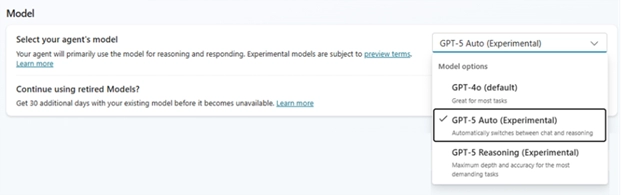
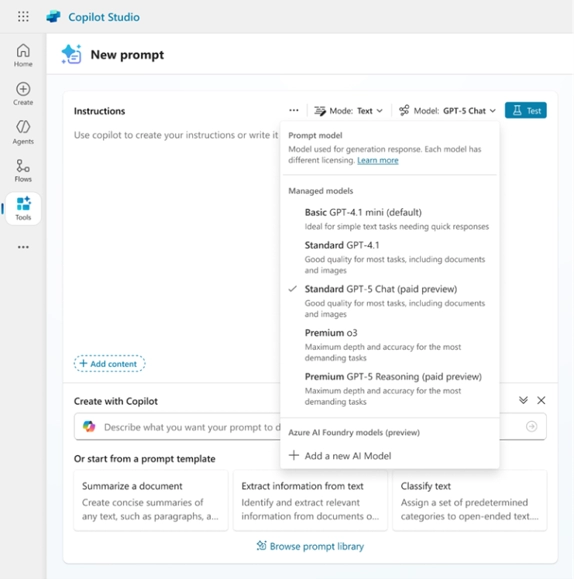
Copilot Studio users will see a new toggle in the agent settings page to select agent models and additional options in the model dropdown for custom prompt tools.

Copilot Studio GPT-5
Copilot Studio GPT-5 Pic

2. Microsoft 365 Copilot | View Recent Activity in Word with Dynamic Document Snapshot

Introduction
A new Activity tab in the Copilot summary in Word helps users stay informed about document changes. This dynamic snapshot highlights recent comments and edits, making it easier to quickly catch up on what’s new.

When this will happen

  • General Availability (Worldwide): Rollout began in late July 2025 and is expected to complete by late August 2025.

How this will affect your organization
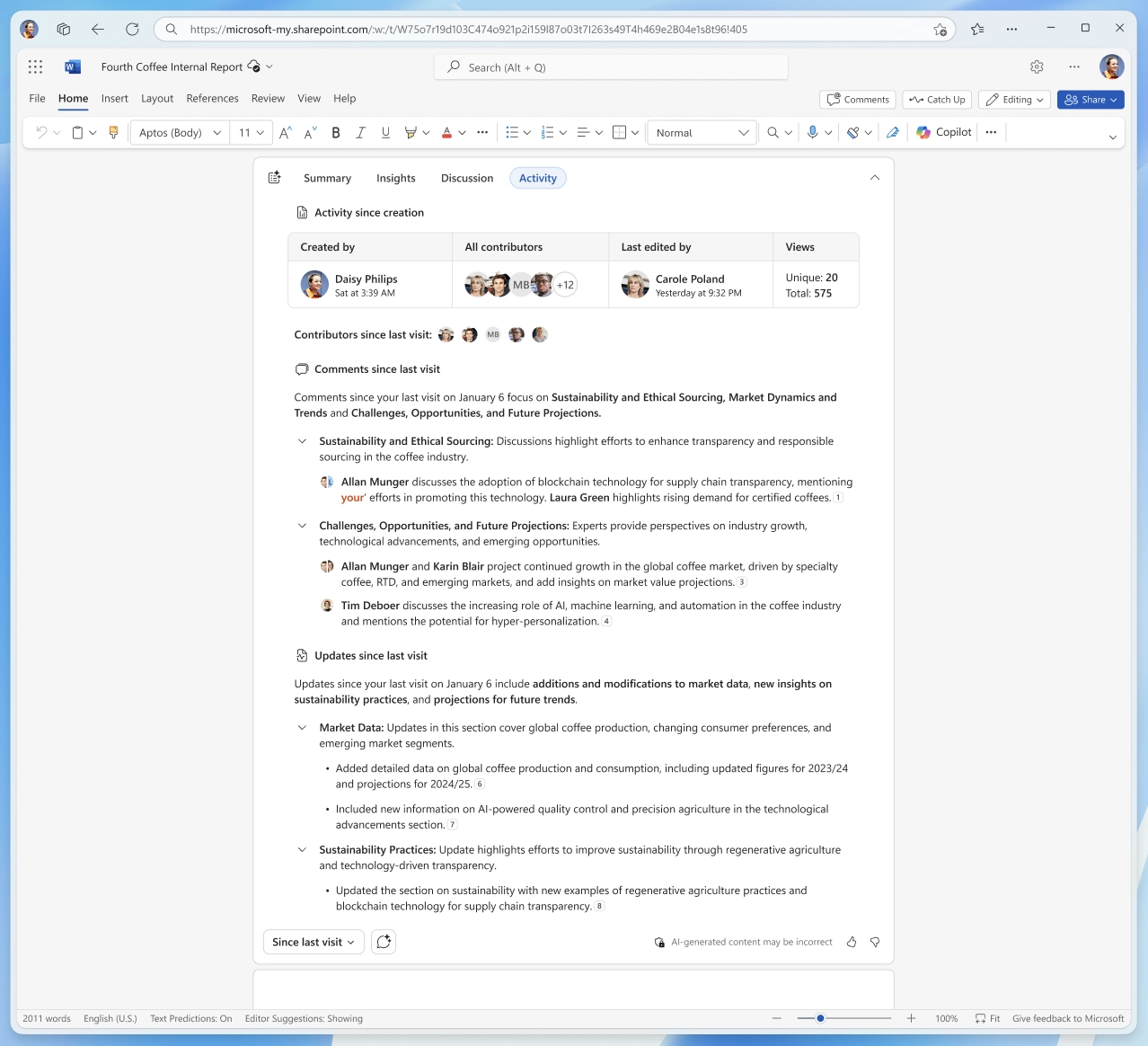
When opening a Word document, users will see the new Activity tab in the Copilot summary at the top of the document. This tab displays recent changes and comments, with filters for:

  • Since last visit
  • Past 3 days
  • Past week
  • Past 2 weeks

A view of recent edits and comments in Word, available through the new Activity tab in the Copilot summary for quick document insights:

A view of recent edits

3. Microsoft 365 Copilot Chat | New Ways to Include Files and Emails in Prompts

Introduction
Microsoft 365 Copilot Chat now makes it easier to bring work content directly into prompts. Users can reference files and emails more seamlessly, improving context and enhancing Copilot responses.

When this will happen

  • Rollout timeline to be announced in a future update.

How this will affect your organization

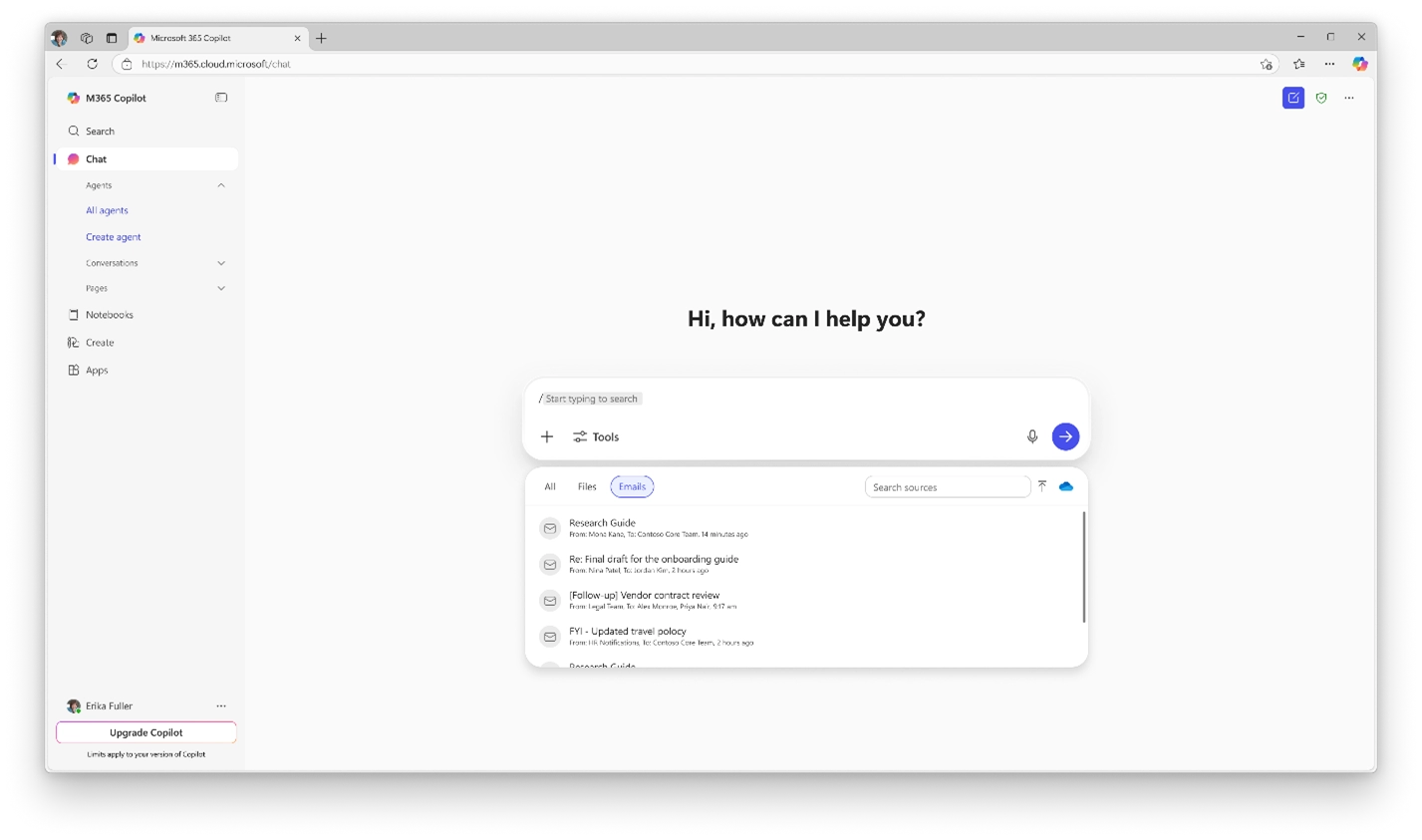
  • Typing ‘/’ in the prompt box lets users quickly search and insert files or emails.
  • Some suggested prompts beneath the input box will now include relevant files or emails to help users start faster.
  • This capability streamlines prompt creation, reduces context-switching, and improves productivity.
New Ways to Include Files and Emails in Prompts

4. Microsoft 365 Copilot Chat | Editing with the New Visual Editor

Introduction
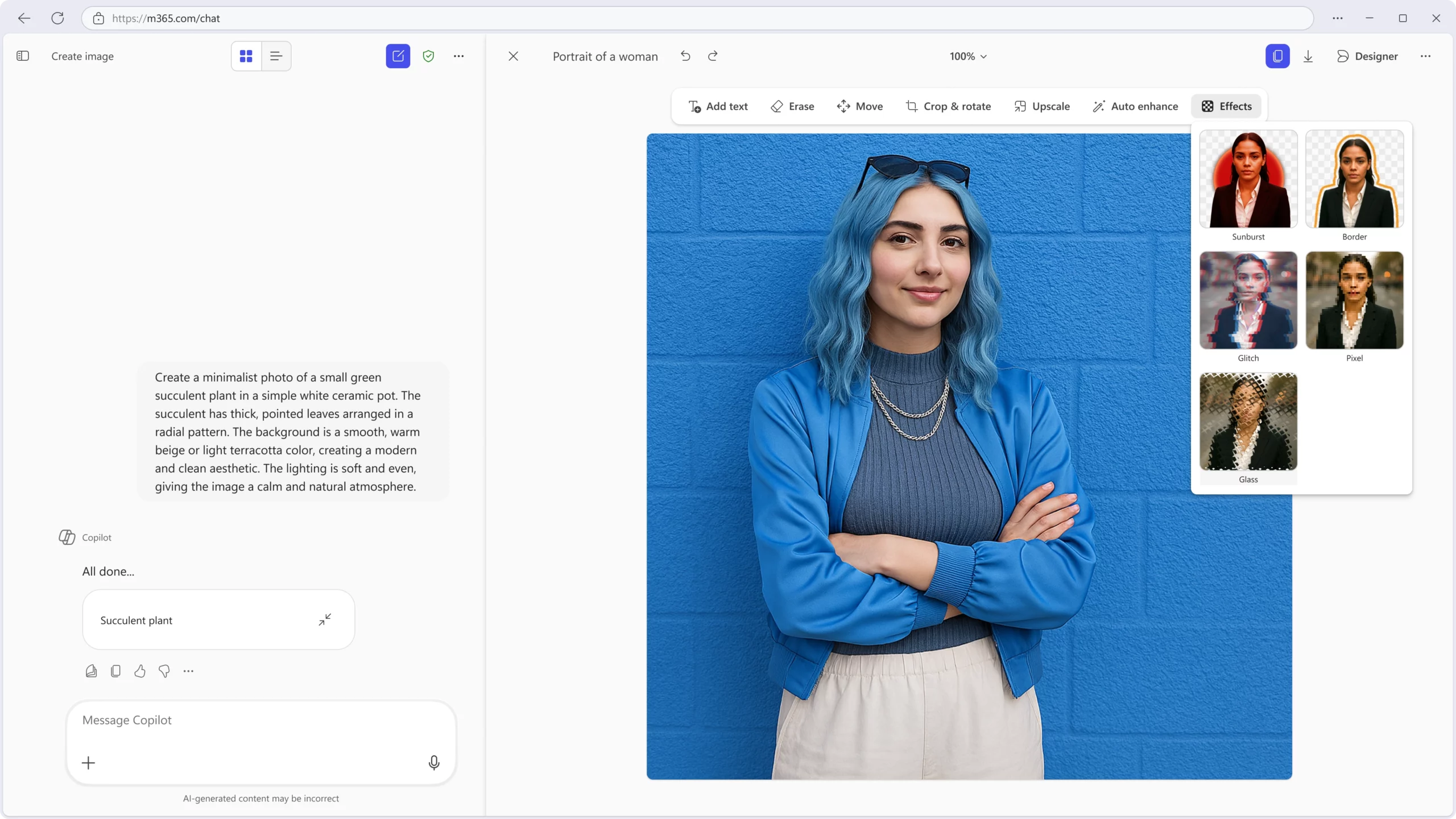
Copilot Chat is adding a side-by-side visual editor that makes it easier to refine and edit images without losing context. The editor combines natural language guidance with canvas-based controls, helping users create, adjust, and enhance visuals more effectively.

When this will happen

  • General Availability (Worldwide): Rollout begins September 2025.

How this will affect your organization

  • Users can seamlessly switch from prompt generation to image editing.
  • Features include quick adjustments, upscaling, and auto-enhancement for more polished results.
  • This update helps teams iterate faster and produce higher-quality visual content directly within Copilot Chat.
Side by side in Chat in Microsoft copilot chat

5. Microsoft Edge for Business | Summarize with Copilot

Introduction
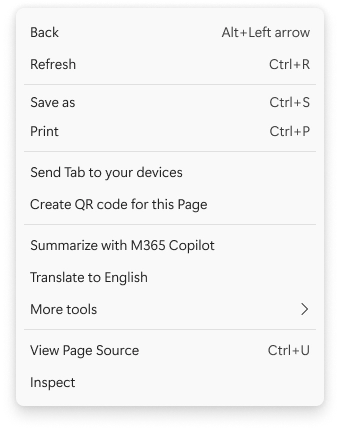
In Microsoft Edge for Business, a new summarization feature is now available. By right-clicking on a webpage, users can instantly generate a Copilot summary of articles, documents, or pages—helping them extract key insights without leaving the browser.

When this will happen

  • General Availability (Worldwide): Rolled out in August 2025.

How this will affect your organization

  • Users can summarize long or dense content directly in Edge for Business.
  • Summaries provide quick insights, improving productivity during research, reviews, and multitasking.
  • This capability is built into the browser—no extra configuration is required.
Context Menu on Microsoft Edge including the summarize with M365 Copilot feature

6. Microsoft Copilot | Filter chat history for easier context recall

Introduction
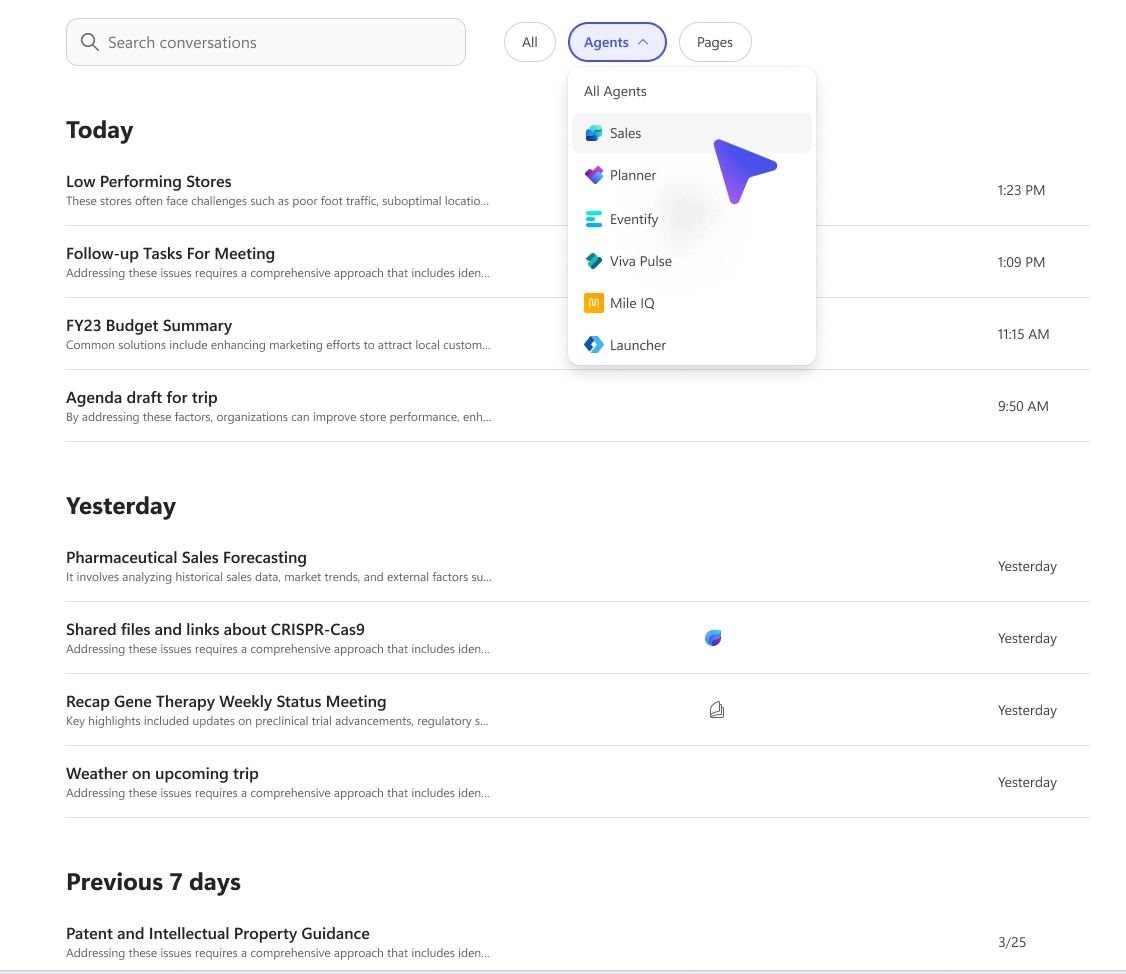
A new filtering capability is coming to Microsoft Copilot, allowing users to refine their view of past conversations. This update makes it easier to locate relevant chats aligned with workflows, helping users quickly revisit prior prompts, responses, and context.

When this will happen

  • General Availability (Worldwide): Rollout schedule to be announced.

How this will affect your organization

  • Users will be able to filter chat history by specific criteria.
  • Improves discoverability of past conversations and enhances productivity.
  • No admin configuration required; the feature is available by default.
Filter chat history for easier context recall in Microsoft Copilot chat

7. Microsoft Outlook | Updated Copilot Chat interface with new conversation view

Introduction
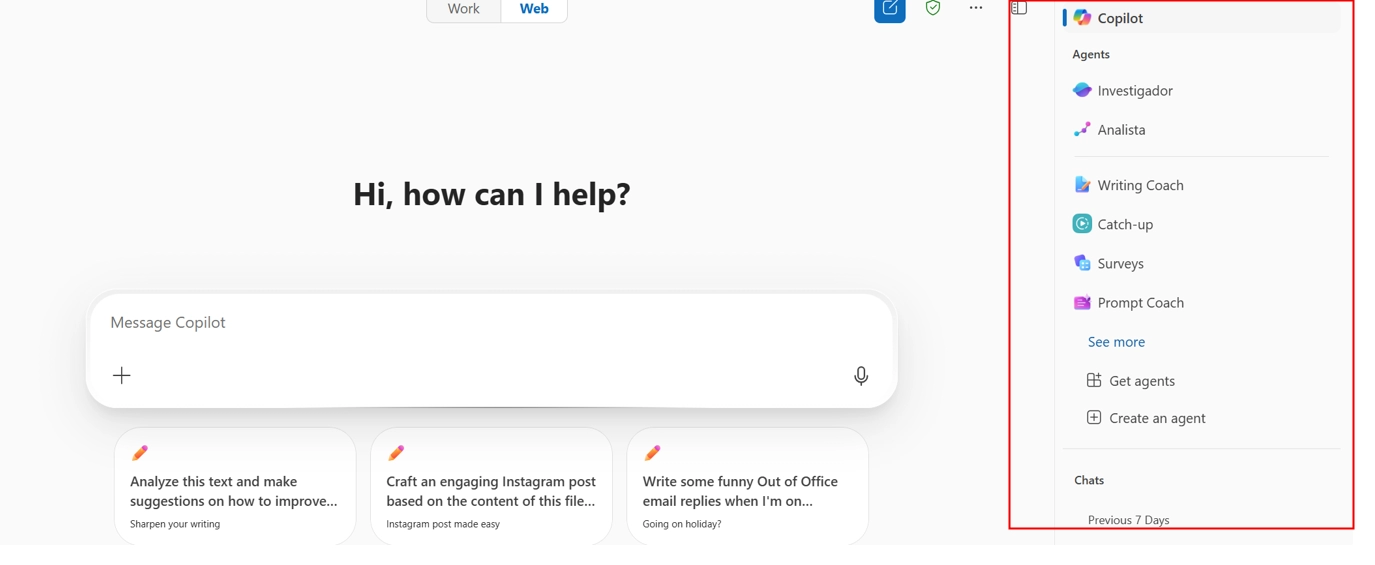
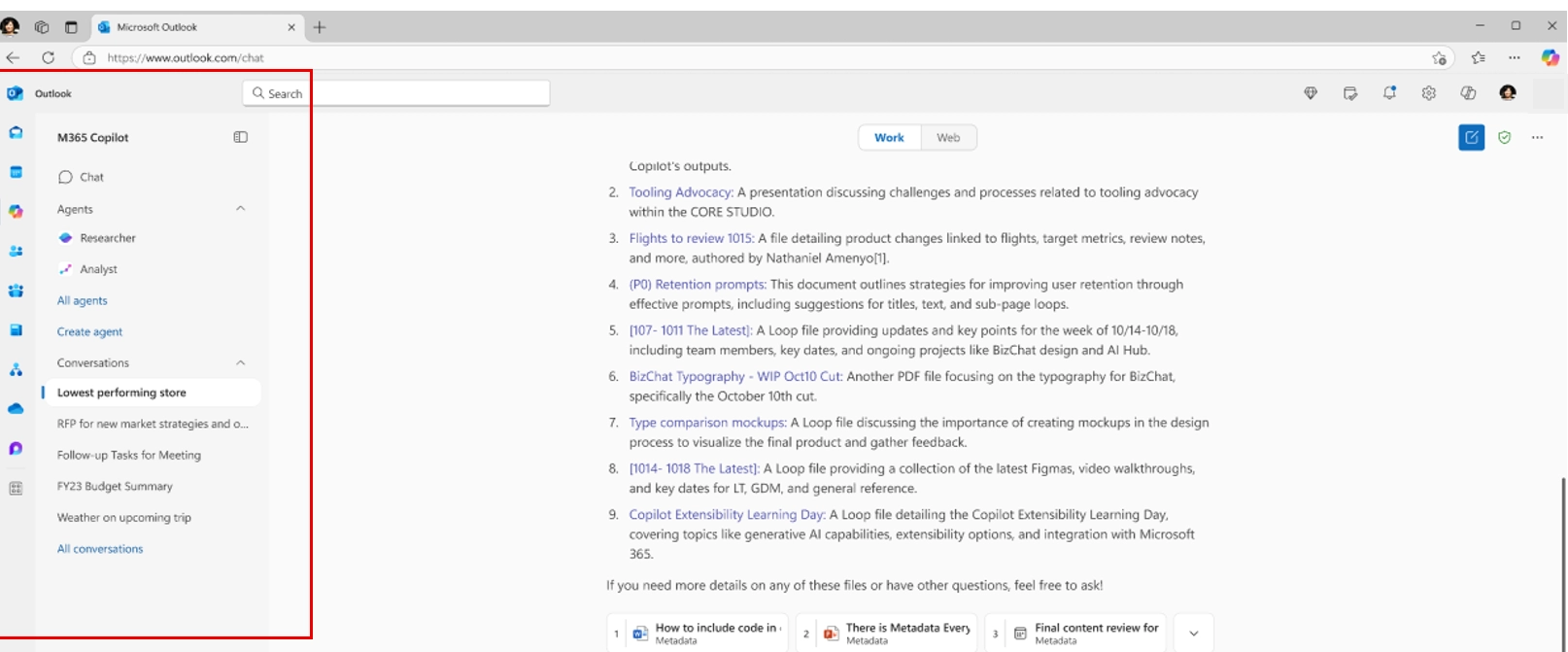
The Copilot Chat experience in Outlook is getting a refreshed interface to improve usability and streamline navigation. The navigation pane will now appear on the left side of the screen—aligning with layout patterns across Microsoft 365 apps like Teams and OneNote. A new All Conversations page also provides a comprehensive view of chat history, making it easier to manage and revisit past interactions.

When this will happen

  • General Availability (Worldwide): Rollout begins mid-August 2025 and is expected to complete by mid-August 2025.

How this will affect your organization

  • The navigation pane for Copilot Chat moves from the right to the left side of the interface.
  • Users will gain access to a new All Conversations page for better visibility into chat history.
  • No admin action is required; the update will be enabled automatically.

Figure I. Before this update

Old Copilot Chat interface

Figure II. After this update

New Copilot Chat interface

8. Outlook Mobile | Copilot Chat overlay coming to iOS and Android

Introduction
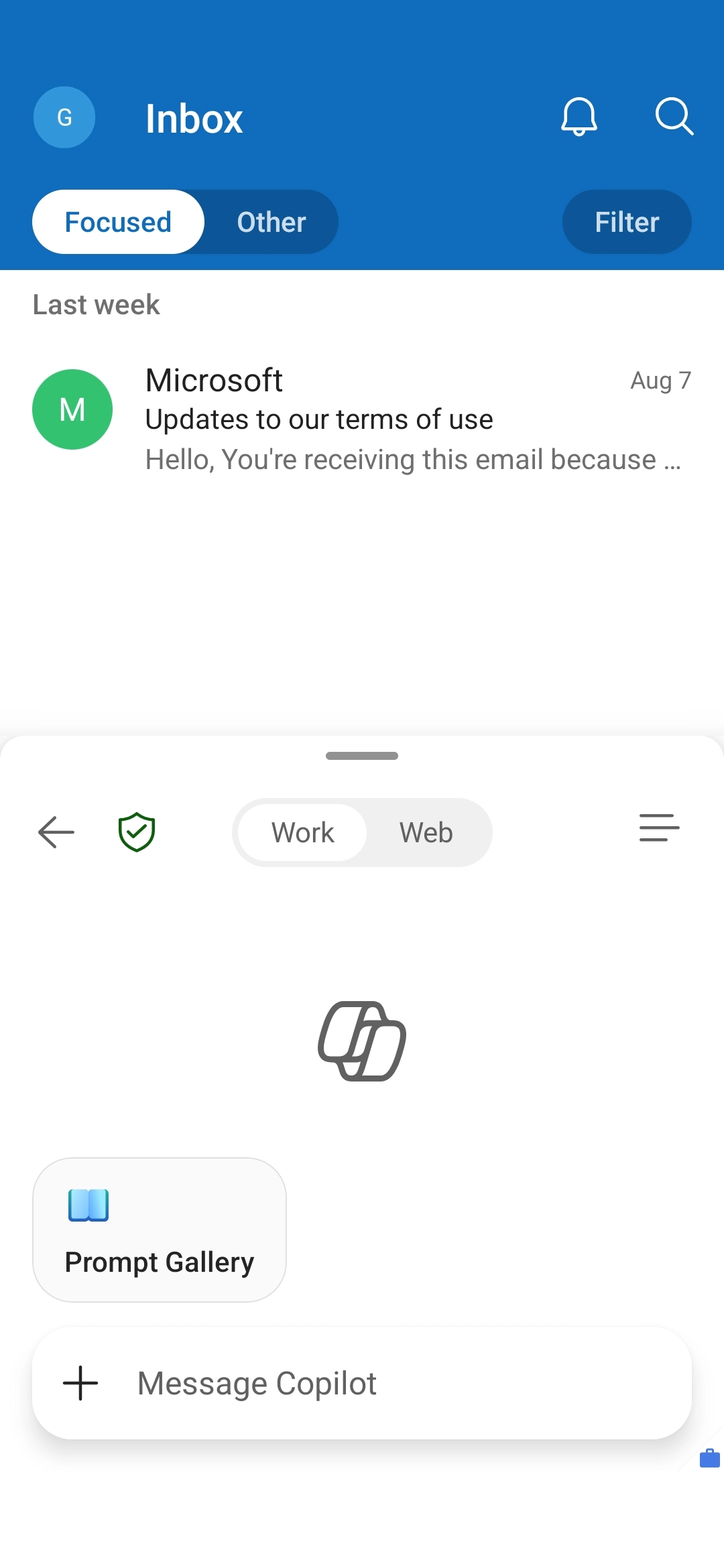
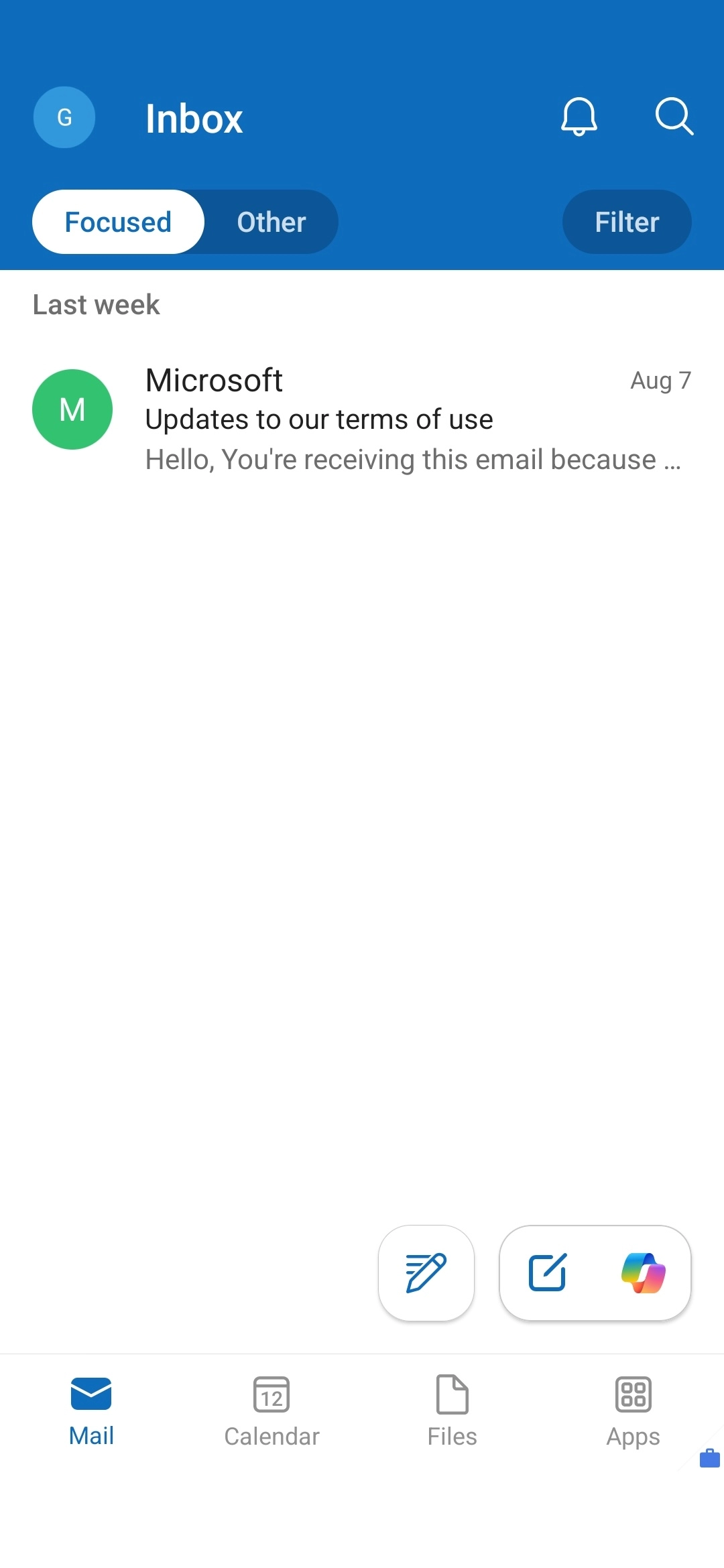
Outlook Mobile is adding a new Copilot Chat overlay for iOS and Android, allowing users to engage with Copilot without leaving their email, calendar, or contacts. The overlay is context-aware, so users can ask Copilot questions directly related to what’s on their screen. Those with a Microsoft 365 Copilot license will receive richer, personalized responses powered by Microsoft 365 Graph.

When this will happen

  • General Availability (Worldwide, GCC, GCCH, DoD): Rollout begins early September 2025 and is expected to complete by early March 2026.

How this affects your organization

  • All Outlook Mobile users will receive the new Copilot Chat overlay by default.
  • No changes to Copilot Chat availability, licensing, or admin controls.
  • No admin action is required.

Copilot Chat overlay in Outlook Mobile (iOS) - Interact with Copilot while viewing email content for contextual assistance:

Copilot Chat overlay in Outlook Mobile (iOS) - Interact with Copilot while viewing email content for contextual assistance:

Copilot Chat overlay in Outlook Mobile (Android) - Seamless access to Copilot via the bottom navigation bar to ask questions about on-screen content:

Copilot Chat overlay in Outlook Mobile (Android) - Seamless access to Copilot via the bottom navigation bar to ask questions about on-screen content
Written & Reviewed by

Jasjit Chopra

Chief Executive Officer
Comment Now

Leave a Reply

Your email address will not be published. Required fields are marked *

More from this Category
Newsletter blog header - Penthara AI
Microsoft Copilot

What's new in Microsoft Copilot | October 2025

Discover the latest Microsoft 365 Copilot updates for November 2025, including GPT-5 as the new default model, enhanced search, smarter...

Microsoft Copilot

What's new in Microsoft | April 2026 Updates

Monthly updates, news & events from Microsoft to help you & your business grow & get best out the Microsoft...

Microsoft Copilot

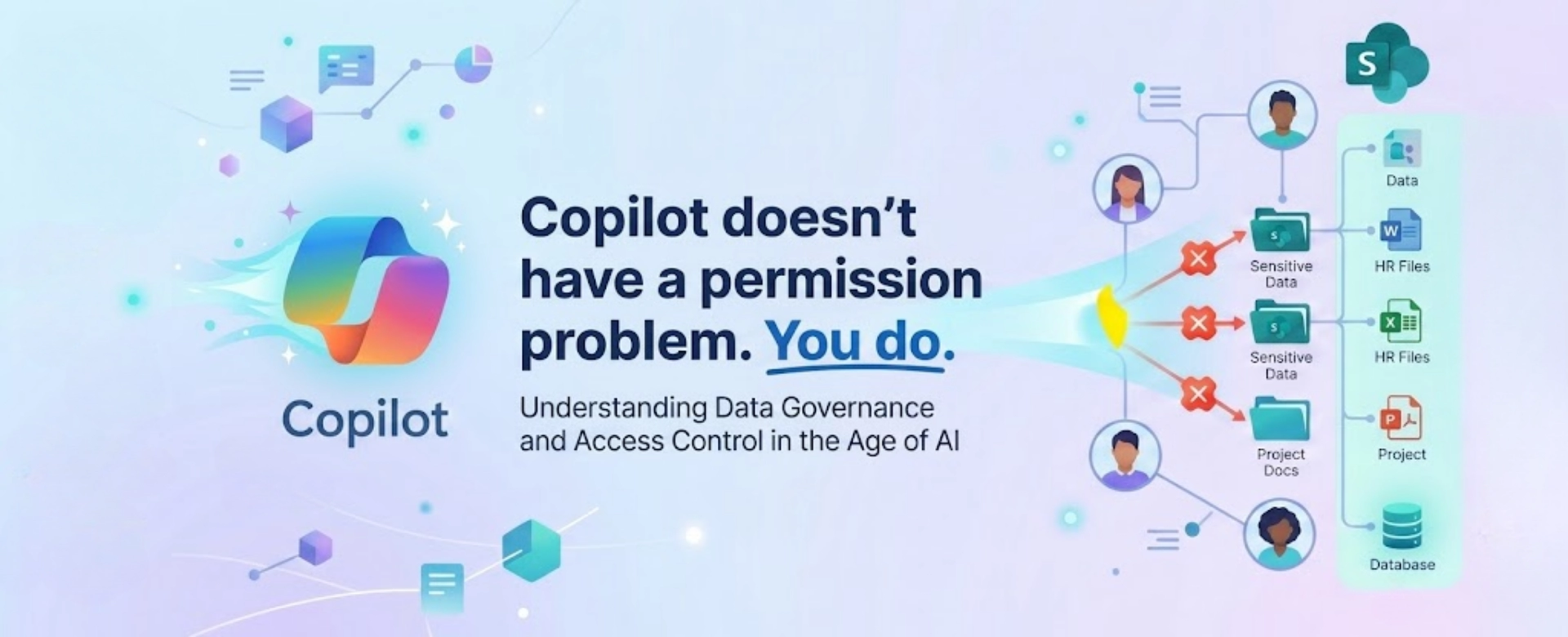
Securing Copilot Studio Agents: What Organizations Miss Until It’s Too Late

Learn how to secure Copilot Studio agents with best practices for authentication, DLP, runtime protection, compliance, and governance to prevent...

crossmenuchevron-down