Penthara-Logo-Dark
For Organizations
What's New in Microsoft Copilot in November 2025

What's new in Microsoft Copilot | November 2025

Discover the latest Microsoft 365 Copilot updates for November 2025, including GPT-5 modes, new Word/Excel/PowerPoint agents, guided learning, and Sora 2 video creation.

Microsoft Copilot

1. Microsoft 365 Copilot: GPT-5 Mode selector adds Auto, Instant, and Thinking modes

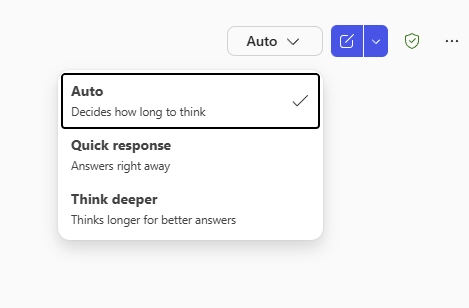
GPT-5 is now the default model in Copilot Chat, and users can select how much reasoning Copilot applies when generating responses. Three modes are available:

  • Auto (default): Copilot determines the appropriate response depth.
  • Quick response (chat): Provides faster, direct responses.
  • Think deeper (reasoning): Allows extended processing time for more detailed or complex output.

When this will happen
General Availability (Worldwide): December 4, 2025 – December 8, 2025.

How this affects your organization

Who is affected: All users with access to Microsoft 365 Copilot.

What will happen:

  • Users will see a new reasoning selector in Copilot Chat.
  • GPT-5 remains the default model, with reasoning options available for supported prompts.
  • No configuration changes are required; the feature is enabled by default.
GPT-5 Mode selector adds Auto, Instant, and Thinking modes

2. Microsoft Word, Excel, and PowerPoint agents: A new Copilot experience for content creation

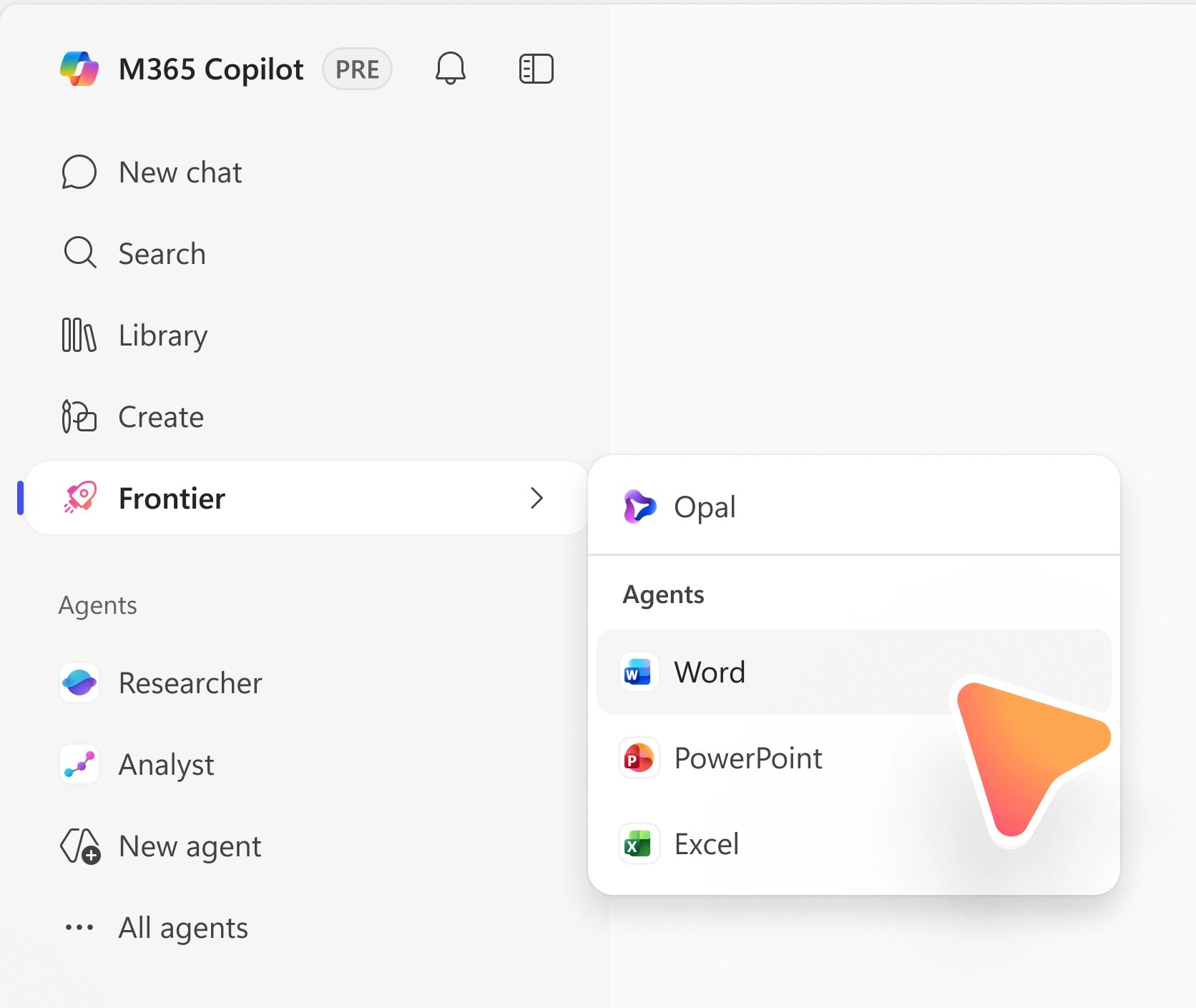
New Word, Excel, and PowerPoint agents are being introduced in Microsoft 365 Copilot to support content creation directly within Copilot Chat in the Frontier program. These agents use web and enterprise grounding to assist users with creating documents, workbooks, and presentations. Each agent supports multi-turn chat, allowing users to refine and iterate content through an interactive conversation.

When this will happen
Frontier Public Preview (Worldwide): November 18, 2025.

How this affects your organization

Who is affected: Users in Frontier program tenants with Anthropic enabled.

What will happen:

  • Word, Excel, and PowerPoint agents will be available in the navigation pane of the Microsoft 365 Copilot app and in the Tools menu within Copilot Chat across supported apps.
  • Users can also call agents using “@” mentions (for example, @PowerPoint).
  • The feature is enabled automatically for eligible users; no additional configuration is required beyond existing Frontier and Anthropic settings.
Microsoft Word, Excel, and PowerPoint agents: A new Copilot experience for content creation

3. Microsoft 365 Copilot: New Explore Pane for guided learning

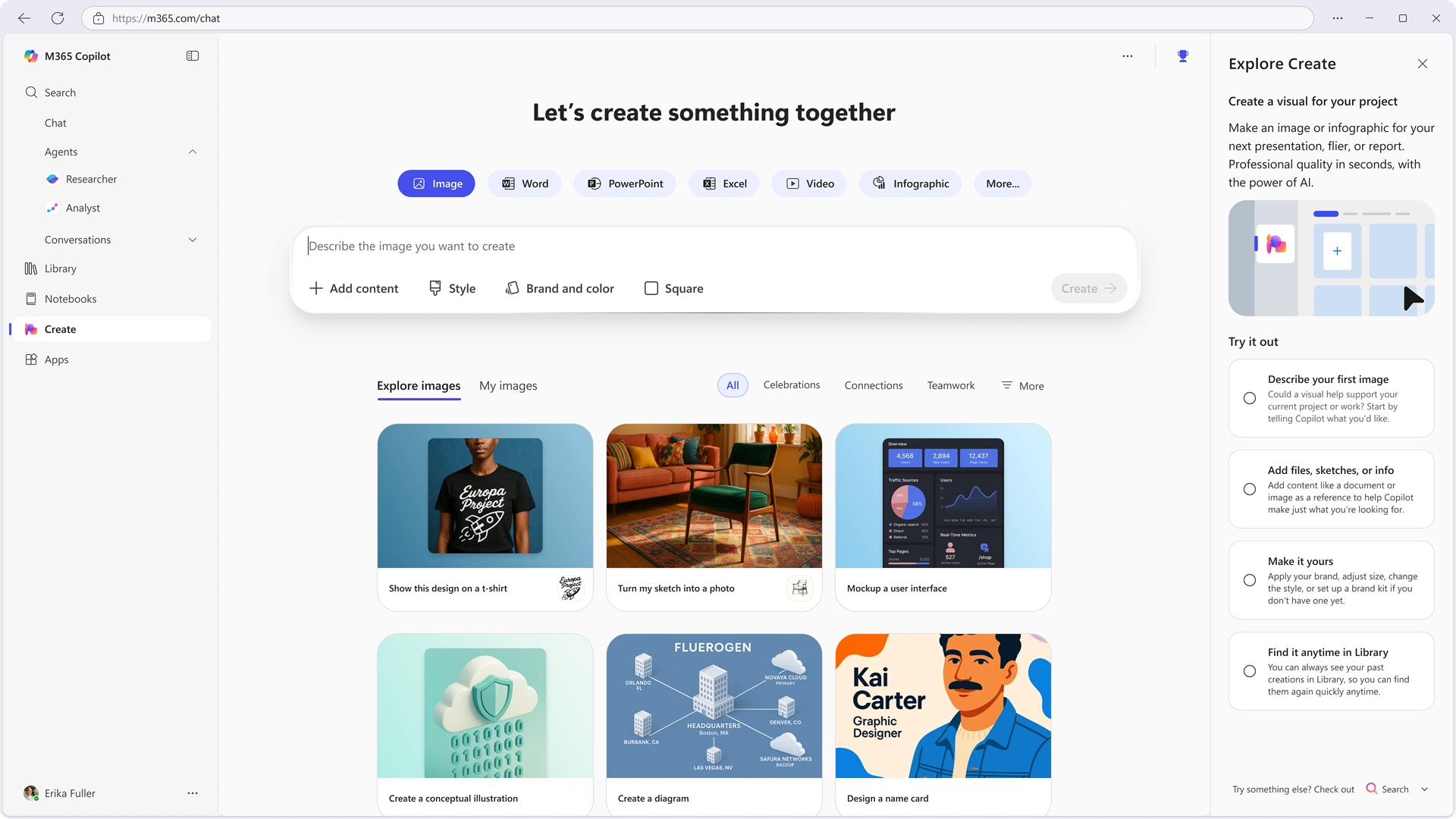
The Explore Pane introduces a guided side panel in the Microsoft 365 Copilot app to help users learn how to use Copilot more effectively. The experience provides contextual, step-by-step guidance across the Create, Search, and Notebooks modules to support user adoption and help users build confidence with AI-powered workflows.

When this will happen
Targeted Release (Worldwide): Early December 2025 – late December 2025.

How this affects your organization

Who is affected: Users of the Microsoft 365 Copilot app on Web, Windows, and Mac with Commercial SKUs (Starter and Premium).

What will happen:

  • A new Explore Pane will appear when users access the Create, Search, or Notebooks modules.
  • The pane will provide guided steps and contextual support to help users understand and use module capabilities.
  • The feature is enabled by default and does not require configuration or administrative action.
Microsoft 365 Copilot: New Explore Pane for guided learning

4. Microsoft 365 Copilot: Summaries and insights landing page in Copilot Notebooks

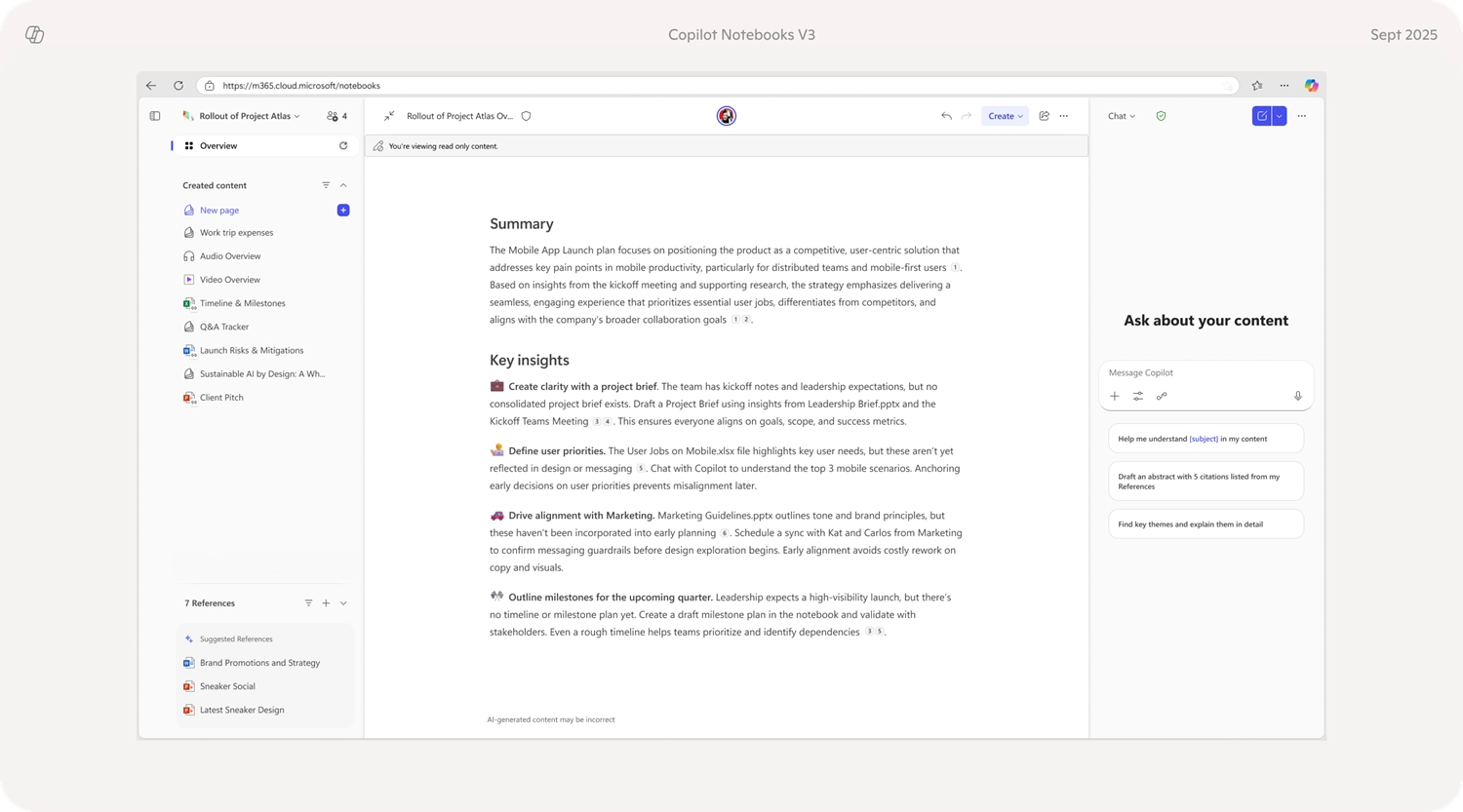
Copilot-powered summaries and insights will be available as a landing page within Copilot Notebooks to help users quickly understand referenced content. The feature will initially be available on the web in both Preview and General Availability, with support for iOS and Android planned for a later release. A Microsoft 365 Copilot license is required.

When this will happen

  • Public Preview (Worldwide): Mid-November 2025 – early December 2025
  • General Availability (Worldwide): January 2026 – February 2026

How this affects your organization

Who is affected: Users with a Microsoft 365 Copilot license and access to Copilot Notebooks.

What will happen:

  • A Copilot-generated summaries and insights landing experience will appear when users open a Copilot Notebook.
  • Mobile support (iOS and Android) will be introduced in a future release.
  • No configuration changes or admin actions are required.
Copilot: Summaries and insights landing page in Copilot Notebooks

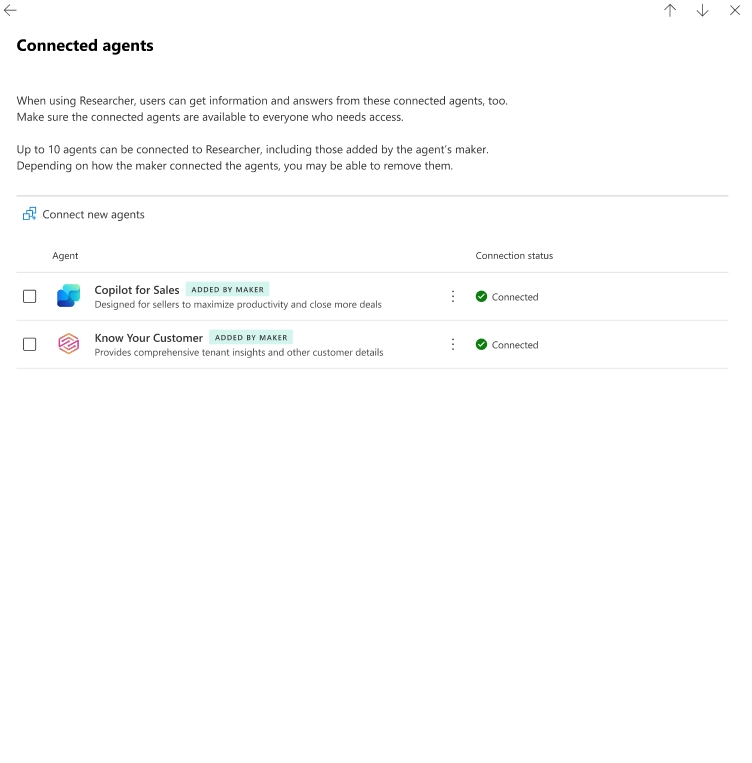
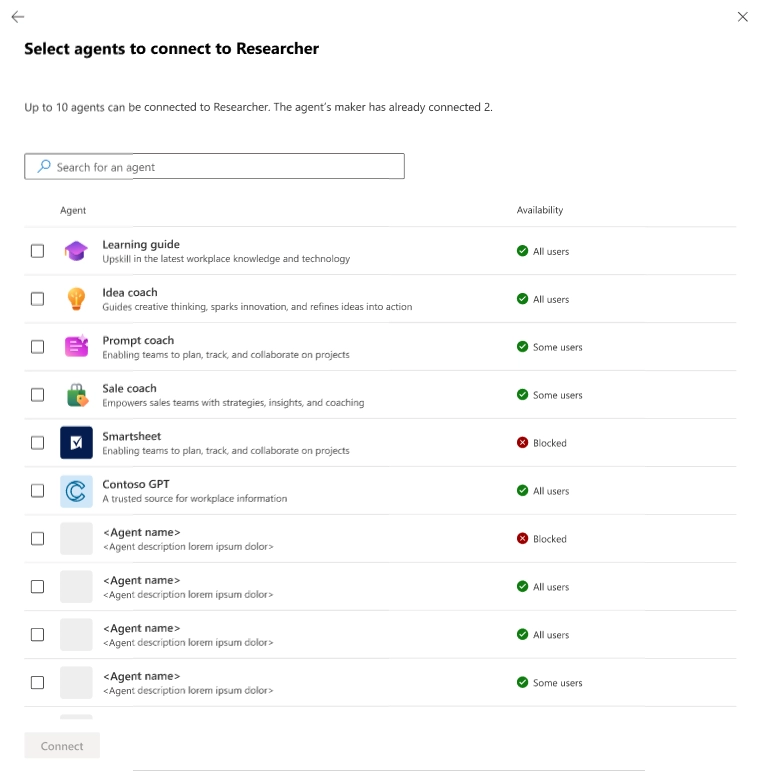
5. Microsoft 365 Copilot: Configure connected agents for Researcher and other agents

Support for connected agents is being introduced in Microsoft 365 Copilot, enabling one agent to query another for additional context or data. This enhancement allows agents to provide more complete and informed responses. For example, the Researcher agent may request sales or inventory information from other enterprise agents when needed.

When this will happen
Public Preview (Worldwide): Mid-November 2025 – late February 2026.

How this affects your organization

Who is affected: Admins managing Microsoft 365 Copilot agents in the Microsoft 365 admin center. This applies to all licenses that include Microsoft 365 Copilot Chat, including free and paid versions.

What will happen:

  • Agents will be able to query other connected agents for additional information.
  • The Agents page in the Copilot hub will display configured connected agents.
  • Admins will be able to modify connected agent settings when allowed by the developer.
  • Users must acquire both the primary and connected agents to use this functionality.
  • Users can enable or disable acquired agents per conversation.
  • Researcher will be the first agent to support this capability starting Q4 2025.

Screenshot 1 - Early draft UI (experience subject to change closer to rollout):

Screenshot 1 - Early draft UI (experience subject to change closer to rollout)

Screenshot 2 - A second view of early draft UI (experience subject to change closer to rollout): 
Screenshot 2 - A second view of early draft UI (experience subject to change closer to rollout)

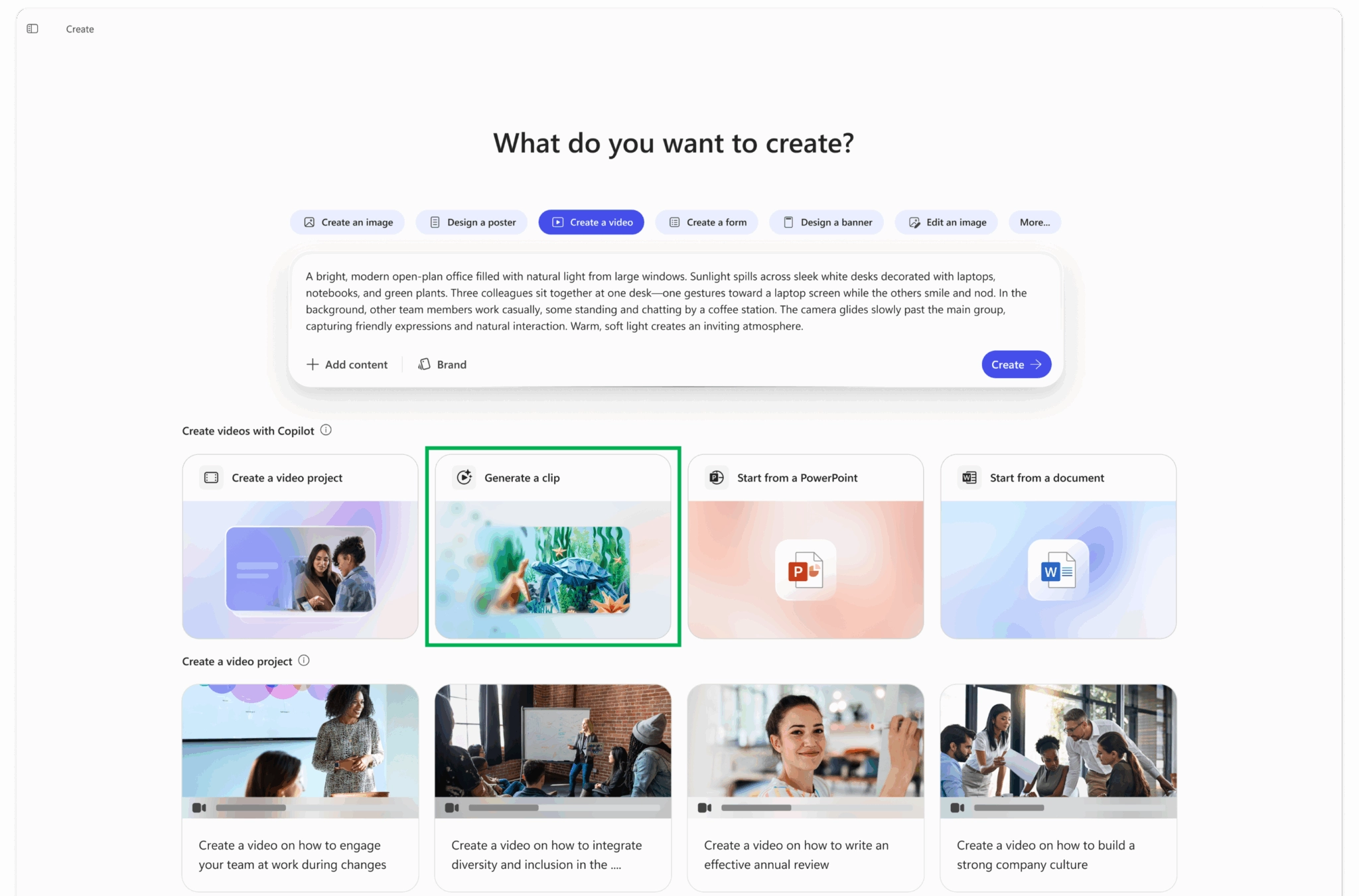
6. Microsoft 365 Copilot: OpenAI Sora 2 now integrated for AI video generation

OpenAI’s Sora 2 model is now available in Microsoft 365 Copilot, enabling users to generate short, realistic 720p videos from text prompts within the Create experience. Videos include synchronized audio and are stored securely in OneDrive or SharePoint, inheriting existing compliance and governance settings.

When this will happen

  • Public Preview (Frontier tenants): Available now for licensed Microsoft 365 Copilot users.
  • General rollout with admin controls: Beginning late November 2025.

How this affects your organization

Who is affected: Users with Microsoft 365 Copilot access in Frontier-enabled tenants.

What will happen:

  • Users will be able to create AI-generated videos through the Create experience in Microsoft 365 Copilot.
  • Admins will have a dedicated controls toggle to manage access to Sora 2 video generation.
  • Generated videos will automatically follow existing organizational security, storage, and data management policies.
Microsoft 365 Copilot: OpenAI Sora 2 now integrated for AI video generation
Written & Reviewed by

Jasjit Chopra

Chief Executive Officer
Comment Now

Leave a Reply

Your email address will not be published. Required fields are marked *

More from this Category
Microsoft Copilot

Creating a Copilot Agent for SharePoint: Step-by-Step Guide

Learn how to create a Copilot Agent for SharePoint using SharePoint and Copilot Studio. Follow this step-by-step guide to build...

Newsletter blog header - Penthara AI
Microsoft Copilot

What's new in Microsoft Copilot | December 2025

Newsletter blog header
Microsoft Copilot

What's new in Microsoft Copilot | January 2026

Discover the latest Microsoft 365 Copilot updates for January 2026: Outlook emails in Copilot, Agent mode in Word, Excel &...

crossmenuchevron-down